


Aplikasi Panduan Setup AV Receiver Yamaha
Aplikasi Panduan Setup AV Receiver Yamaha
AV SETUP GUIDE adalah aplikasi yang membantu Anda dalam hal koneksi kabel antara receiver AV dan perangkat sumber serta pengaturan receiver AV.
Aplikasi ini memandu Anda dalam melakukan berbagai pengaturan seperti koneksi speaker, TV dan koneksi perangkat sumber dan menetapkan power amp.
Ilustrasi sistem dan gambar receiver AV yang sebenarnya akan membantu Anda memahami dengan mudah cara membuat koneksi antar perangkat.
Jika receiver Anda dapat dimasukkan ke dalam jaringan, pengaturan parameter pada aplikasi ini akan secara otomatis disalin ke receiver AV Anda untuk menyederhanakan penyiapan.



Wide Range of Functions
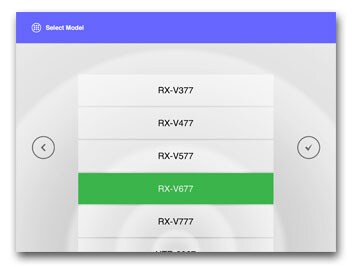
AV Receiver Model Select
Select your model
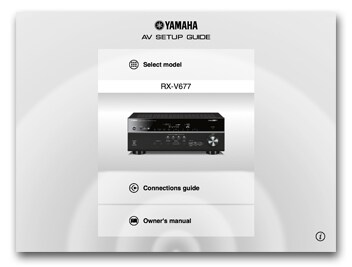
Home Menu
Your model is displayed.
Start connection guide or view owner's manual.
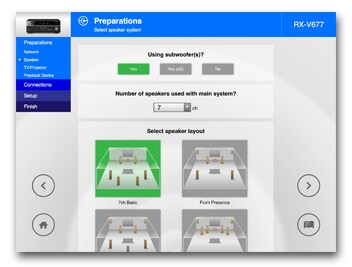
Speaker Layout
Based on your selected speaker confiuration for the room, this app shows you all the possible speaker layout avaialble to select.
Source Device Select
Select all connecting devices from the list.Check input/output terminals on these devices.

Confirmation of TV/source devices and cables
Based on Source Device Select result, this app shows you all necessary interconnection cables.

TV / Source Devices Connection
Based on your selection of input/output on connected devices, this app shows you to which input / output terminals on the receiver these devices need to be connected.

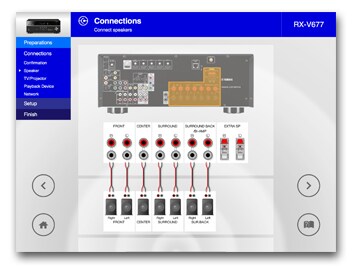
Speaker Connection
Based on your selected speaker layout in earlier step, this app shows you to which speaker terminals the speakers need to be connected.
Automatic Setup via Network
Setting parameters in this app will be automatically copied to your AV receiver.
*This function is supported only by network capable models.

YPAO Setting Guidance
YPAO automatically optimize the speaker settings to suit your room.
This app guides you how to engage YPAO and checks if the speaker connection is correct.
*Certain models will skip this step.

Model yang Kompatibel
RX-A8A, RX-A6A, RX-A4A, RX-A2A, RX-A3080, RX-A2080, RX-A1080, RX-880, RX-A780, RX-A680, RX-A3070, RX-A2070, RX-A1070, RX-A870, RX-A770, RX-A670, RX-A3060, RX-A2060, RX-A1060, RX-A860, RX-A760, RX-A660, RX-A3050, RX-A2050, RX-A1050, RX-A850, RX-A750, RX-A550, RX-AS710, RX-AS710D, RX-A3040, RX-A2040, RX-A1040, RX-A840, RX-A740
RX-V6A, RX-V4A, RX-V3085, RX-V2085, RX-V1085, RX-V685, RX-V585, RX-V485, RX-D485, RX-V385, RX-V3083, RX-V2083, RX-V1083, RX-V683, RX-V583, RX-V483, RX-V383, RX-V3081, RX-V2081, RX-V1081, RX-V781, RX-V681, RX-V581, RX-V481, RX-V481D, RX-V381, RX-V3079, RX-V2079, RX-V1079, RX-V779, RX-V679, RX-V579, RX-V479, RX-V379, RX-V3077, RX-V2077, RX-V1077, RX-V777, RX-V677, RX-V577, RX-V477, RX-V377
RX-S602, RX-S601D, RX-S601, RX-S600D, RX-S600
HTR-5072, HTR-4072, HTR-3072, HTR-5071, HTR-4071, HTR-3071, HTR-2071, HTR-5069, HTR-4069, HTR-3069, HTR-6068, HTR-4068, HTR-3068, HTR-6067, HTR-5067, HTR-4067, HTR-3067
TSR-5830, TSR-7810, TSR-5810, TSR-7790, TSR-5790
*Some models are not available in some regions.
Persyaratan Sistem
OS: iOS 9.0 or higher, Android OS 4.0.3 or higher
* Compatibility with certain devices can't always be guaranteed.
* A wireless Local Area Network (LAN) and a compatible Yamaha Network AV Receiver residing within the same LAN.
Kebijakan Privasi
* This application will never collect nor externally transfer personal data stored in your smartphone / tablet.
* This application performs following functions for purposes described below.
Making a connection under WiFi-enabled environment
The application uses WiFi function on your mobile terminal for the purpose of operating network-enabled devices.
Accessing to music information stored in your smartphone / tablet
This application accesses to music information stored in your smartphone / tablet for the purpose of displaying, playing and editing the music information and/or playlist.
* Spesifikasi dapat berubah sewaktu-waktu tanpa pemberitahuan. Warna dan finishing yang ditampilkan mungkin berbeda dari produk sebenarnya.
